
Cách build network WiFi mesh nhà rộng Gen Z VN 2026 — Eero, Asus, TP-Link
Cách build network WiFi mesh nhà rộng Gen Z VN 2026 — Eero, Asus ZenWiFi, TP-Link Deco. Coverage + Performance + Setup.
Mục lục (67 mục)
Tóm tắt nhanh — mesh systems top
| Hạng mục | Sản phẩm | Coverage |
|---|---|---|
| 🏆 Best overall | Eero Pro 7 / 6E | 175m² × 3 units |
| 💎 Premium tri-band | Asus ZenWiFi XT8 | 200m² + |
| 💰 Budget tri-band | TP-Link Deco X55 | 150m² |
| 🌟 Apple ecosystem | Eero (HomeKit) | Smart home integration |
| 🔥 Performance | Netgear Orbi RBE970 | High-end |
Vì sao mesh WiFi cho nhà
Vấn đề nhà rộng:
- 1 router không cover entire
- Dead zone (phòng xa, tầng trên)
- Signal drop streaming
- Devices disconnect random
Mesh solution:
- 2-3 satellite units
- Seamless roaming
- One network name
- Coverage uniform
Vs traditional extender:
- Extender = separate network
- Mesh = one network seamless
- Speed maintained mesh
When need mesh
Sign you need mesh:
- House > 100m² single floor
- Multi-floor home
-
20 connected devices
- Dead zones experienced
- 4K streaming buffer
Apartment small (< 80m²):
- Single quality router enough
- Save money mesh unnecessary
House 100-200m²:
- 2-unit mesh adequate
- Place strategically
Large house 200m²+:
- 3-4 unit mesh
- Mesh + dedicated wired backhaul
Top 5 chi tiết
1. Eero Pro 7 / Eero 6E (Amazon)
Thông số:
- Wi-Fi 6E or 7
- Tri-band (5GHz + 6GHz + 2.4GHz)
- Up to 175m² coverage per unit
- 100+ devices
- HomeKit compatible
Ưu điểm:
- Easiest setup ever
- Automatic update + manage
- HomeKit + Alexa
- Strong app
- Encrypted by default
Nhược điểm:
- $300-600 per pack
- Subscription Eero Plus optional
- Limited advanced features
Phù hợp với: Want easy + Apple HomeKit user.
2. Asus ZenWiFi XT8 (Wi-Fi 6 tri-band)
Thông số:
- Tri-band dedicated backhaul
- 5400Mbps
- Up to 200m² coverage 2-unit
- AiMesh compatible existing Asus
Ưu điểm:
- Tri-band dedicated backhaul = full speed
- AiProtection Pro free
- VPN built-in
- Gaming features
- Customizable advanced
Nhược điểm:
- $400-500 for 2-pack
- More setup complexity vs Eero
- Bulkier units
Phù hợp với: Power user + Asus loyal.
3. TP-Link Deco X55 (Wi-Fi 6 budget)
Thông số:
- AX3000 dual-band
- 150m² coverage per unit
- 150+ devices total
- USB-C charging
Ưu điểm:
- Budget mesh $$$
- TP-Link reliability
- Easy app setup
- Good range
Nhược điểm:
- Dual-band (vs tri-band premium)
- Slower backhaul
Phù hợp với: Budget mesh first-time.
4. Netgear Orbi RBE970 (high-end)
Thông số:
- Wi-Fi 7 tri-band
- 9.4Gbps total bandwidth
- Per unit 360m² coverage
- 10G WAN port
Ưu điểm:
- Cutting-edge Wi-Fi 7
- Massive coverage
- Premium build
Nhược điểm:
- $1500+ per pack
- Overkill most users
- Need Wi-Fi 7 devices benefit
Phù hợp với: Enthusiast + future-proof.
5. Linksys Velop Pro 7 (Wi-Fi 7 mid)
Thông số:
- Wi-Fi 7
- Tri-band
- 250m² per unit
- Velop platform
Ưu điểm:
- Wi-Fi 7 affordable entry
- Solid coverage
- Cognitive Mesh adapt
Nhược điểm:
- ~$900 for 3-pack
- App less polished
Phù hợp với: Wi-Fi 7 enter budget.
Wi-Fi 6 vs 6E vs 7
Wi-Fi 6 (current standard):
- 2.4GHz + 5GHz
- Faster than older
- Most devices support
- Mature technology
Wi-Fi 6E:
- Add 6GHz band
- Less crowded
- Better latency
- Limited device support (iPhone 15+ Pro, Galaxy S24)
Wi-Fi 7 (newest):
- 6GHz with new features
- Multi-Link Operation (MLO)
- 320MHz channel width
- 4096-QAM
- Maximum theoretical 30Gbps
- Limited devices support yet
For 2026:
- Wi-Fi 6 still sufficient most
- 6E nice if devices support
- Wi-Fi 7 future-proof
Setup mesh
Placement strategy:
Router placement:
- Central location
- High position (top of furniture)
- Open space not closet
Satellite placement:
- Halfway main router + dead zone
- Strong signal between
- Same elevation router
Number of satellites:
- < 100m²: 1 router enough
- 100-200m²: 2 unit
- 200-300m²: 3 unit
- 300m²+: 4 unit
Wired backhaul (best):
- Ethernet cable between mesh units
- Frees up wireless capacity
- Faster speeds
- Less interference
Setup process
App-based (Eero, Deco):
- Download app
- Plug in main router
- Follow app instructions
- Setup additional satellites
- Test coverage walk around
- Optimize placement
Step time:
- 15-30 phút first setup
- 5 phút per additional satellite
Optimization tips
Channel selection:
- App auto-select best channel
- Manual override if needed
- 5GHz less crowded than 2.4GHz
QoS (Quality of Service):
- Prioritize devices (gaming, video call)
- Equal distribution
- Limit per-device bandwidth
Guest network:
- Separate password
- Isolate from main network
- Schedule access
IoT network:
- Separate for smart home devices
- Different password
- Security isolation
Speed expectations
Internet provider VN:
- FPT: up to 1Gbps fiber
- Viettel: similar
- VNPT: similar
- CMC: business
Mesh speed share:
- 5GHz: 200-1000Mbps (close)
- 2.4GHz: 50-150Mbps (far)
- 6GHz: 500-2000Mbps (closest)
Common bottleneck:
- ISP plan speed limit
- Old devices Wi-Fi 5
- Distance + walls
- Interference neighbors
Performance test
Speed test:
- Speedtest.net (different rooms)
- iPerf3 between mesh units
- Compare close vs far
Connection stability:
- Latency test (PingPlotter)
- Packet loss check
- Long-term monitoring
Wired vs Wireless backhaul
Wireless backhaul (default):
- Easier setup
- Mesh units share bandwidth
- Half speed typically client side
Wired backhaul:
- Ethernet between satellites
- Full speed both sides
- Best performance
- Requires running cable
Setup wired:
- Need ethernet port satellite
- Cable from main router to each satellite
- Mesh detects + uses
Security features
Built-in security:
- WPA3 encryption
- Automatic firmware update
- Parental controls
- Device profiles
Premium features ($):
- Eero Plus: VPN, ad-blocking, advanced security ($10/month)
- Asus AiProtection Pro: free
- TP-Link HomeShield: free + premium tier
VPN integration:
- Some mesh built-in VPN server
- Use phone abroad as if home
- Privacy on public Wi-Fi
Tools test network
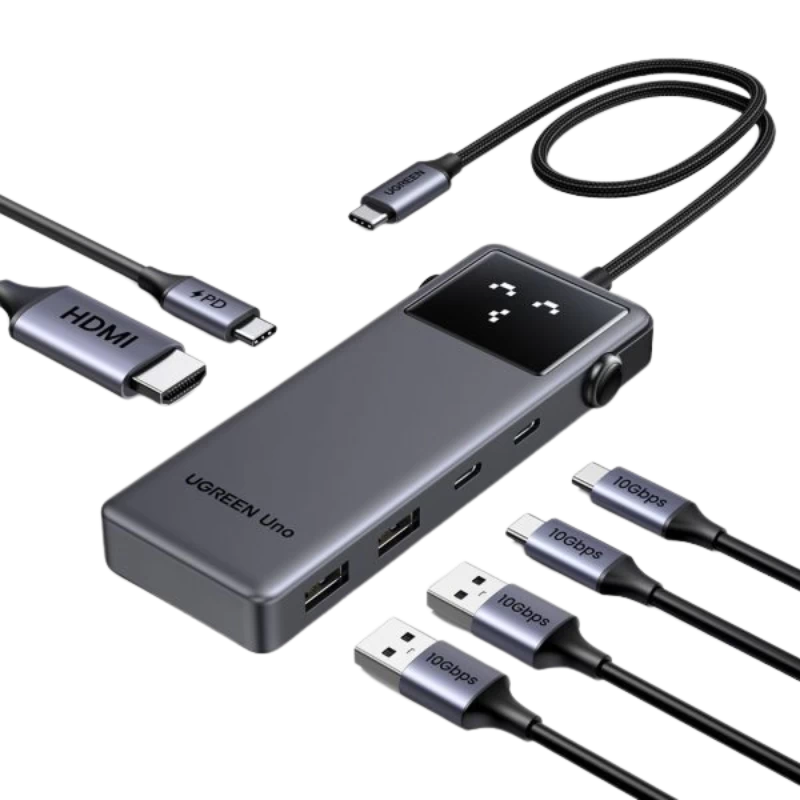
UGreen Hub — ethernet adapter laptop for wired test.
Ứng dụng:
- Speedtest by Ookla (speed)
- iPerf3 (LAN speed)
- WiFi Analyzer (channel)
- Fing (network device discovery)
ISP combo consideration
ISP-provided router:
- Often weak unit
- Replace with mesh better
- Bridge mode existing ISP router
Bridge mode:
- ISP router → WAN only
- Mesh handles routing
- Save double NAT issue
Double NAT:
- Two routers active = problems
- Online gaming issues
- Some apps connect issues
Pricing tiers
Tier basic (~5-7tr):
- TP-Link Deco X55 (2-pack)
- Adequate small house
- Wi-Fi 6 dual-band
Tier nice (~10-15tr):
- Asus ZenWiFi XT8 (2-pack)
- Tri-band performance
- Most homes
Tier premium (~20-30tr):
- Eero Pro 7 (3-pack)
- Wi-Fi 7 latest
- Future-proof 5+ năm
Tier enthusiast (~50tr+):
- Orbi RBE970
- Cutting edge
- Massive coverage
Sai lầm thường gặp
| ❌ Sai | ✅ Sửa |
|---|---|
| ISP router only large house | Mesh for coverage |
| All same room placement | Distribute strategically |
| Channel auto sometimes bad | Manual select less crowded |
| Skip firmware update | Auto-update essential |
| Old Wi-Fi 4/5 router years | Upgrade Wi-Fi 6+ for fast network |
Mua chính hãng ở đâu (VN)
Online:
- Phong Vũ, Mai Hoàng (PC retailers)
- Lazada Asus / TP-Link mall
- Tiki authorized
Hệ sinh thái Apple:
- Eero through Apple ecosystem
- Order US Stack Send
- Limited official VN
Tránh:
- Shopee shop unverified
- Used / refurbished mesh (firmware issues)
- "Better than original" suspicious
Mesh vs Powerline
Powerline:
- Use electrical wiring
- No drilling cables
- Cheaper for some scenarios
Mesh:
- Wireless seamless
- Better performance typically
- More expensive
When powerline:
- Stone walls (signal blocked)
- Single device specific room
- Budget-constrained
Future trends
Wi-Fi 7 mainstream:
- 2026-2027 device support
- Latency dramatic improvement
- MLO use multiple bands simultaneous
Matter protocol:
- Smart home + Wi-Fi integration
- Cross-ecosystem
- Simpler setup
Cellular failover:
- Built-in 5G modem some mesh
- Automatic switch if internet down
- Premium feature emerging
FAQ chi tiết
Mesh có replace ISP router không?
Yes (preferred). Set ISP router bridge mode, mesh handles routing. Better performance + features.
3-unit mesh place 2 units same room OK?
Diminishing returns. 1 unit each "zone" better. Edge of one zone = next unit placement.
Wi-Fi 7 worth waiting?
If buying now mid-2026:
- Wi-Fi 6/6E excellent
- Wi-Fi 7 nice future-proof but expensive
- Devices supporting Wi-Fi 7 still rare
Mua mesh chính hãng VN?
- Lazada Asus / TP-Link mall (official)
- Phong Vũ, Mai Hoàng physical
- Best Buy / Apple resellers + Apple Store
- Avoid: Shopee shop tiny unverified